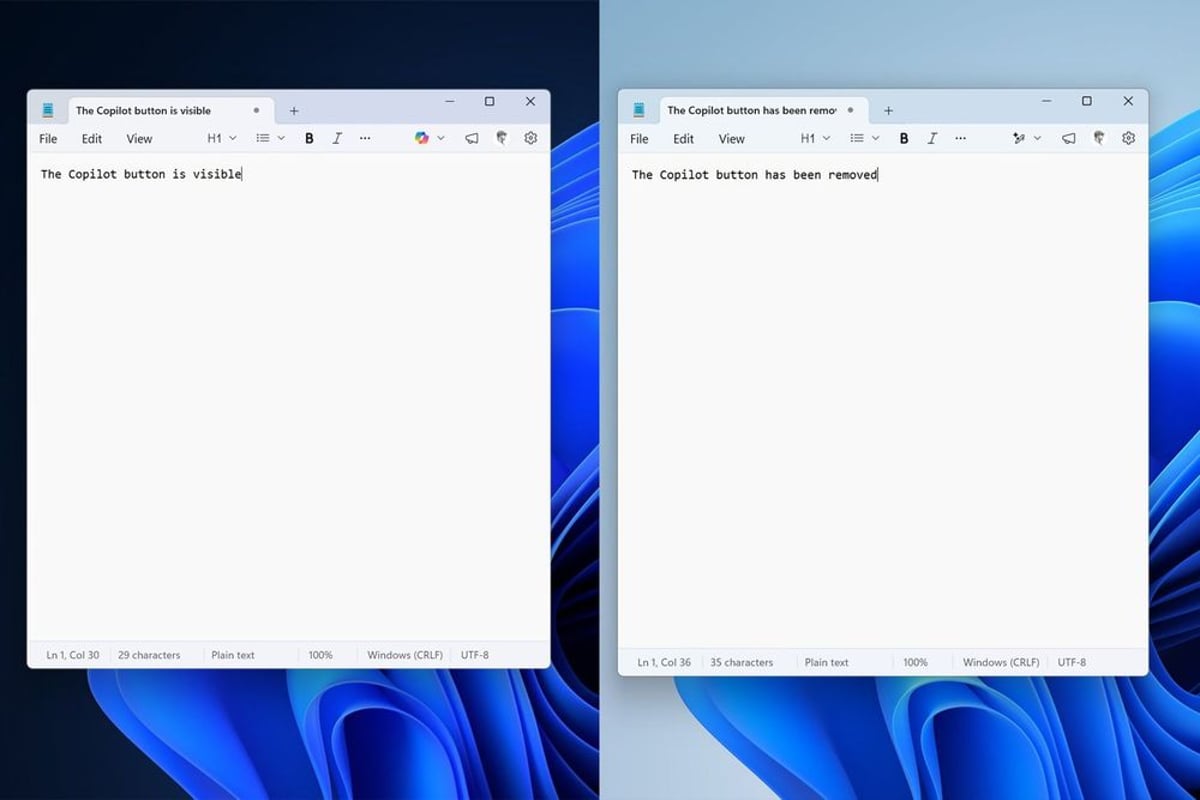
Microsoft is stripping Copilot buttons from core Windows 11 apps, marking a rare retreat in the company's aggressive AI push. The latest Windows Insider builds show Notepad and Snipping Tool ditching dedicated Copilot buttons in favor of subtler "writing tools" menus, part of what Microsoft calls reducing "unnecessary" AI entry points. It's a telling pivot - the AI features stay, but the in-your-face branding is going away, signaling that even Microsoft thinks it went too far with Copilot promotion.
Microsoft just blinked in its year-long campaign to plaster Copilot across every surface of Windows. The company is pulling dedicated Copilot buttons from key Windows 11 apps, replacing them with more understated menus that still deliver AI features but don't scream "COPILOT" at users every time they open Notepad.
The changes showed up first in Windows Insider builds this week. Tom Warren at The Verge spotted the removal in Notepad, where the prominent Copilot button has been swapped for a generic "writing tools" menu. The Snipping Tool's Copilot button similarly vanished when users select screen areas to capture. Photos and Widgets apps are getting the same treatment.
This isn't Microsoft abandoning its AI strategy - far from it. The underlying capabilities remain fully functional. You can still ask Copilot to rewrite paragraphs in Notepad or analyze screenshots in Snipping Tool. But you'll access these features through contextual menus instead of a branded button demanding attention in every toolbar.
The shift stems from Microsoft's broader commitment to fix Windows 11, announced earlier this year after mounting user complaints about performance and interface bloat. The company promised to reduce "unnecessary Copilot entry points" - corporate speak for "we put too many buttons everywhere and people hate it."
It's a fascinating reversal for a company that spent 2025 making Copilot unavoidable. Microsoft added a dedicated Copilot key to new keyboards, embedded the assistant in File Explorer, and pushed it into virtually every inbox through Outlook integration. CEO Satya Nadella positioned Copilot as the defining interface for Microsoft's AI-first transformation during multiple earnings calls.
But enterprise customers started pushing back. IT administrators reported user confusion about when to use Copilot versus when to just, you know, use the actual app. The buttons added visual clutter without clear value for workflows that didn't need AI assistance. Some organizations disabled Copilot entirely through group policies rather than field support tickets about the interface changes.
The UX pullback reveals tensions in how tech giants are deploying AI. Google faced similar criticism when it auto-enabled AI Overviews in search, then quietly dialed back the feature after accuracy issues. Apple took the opposite approach with Apple Intelligence, making AI features opt-in and contextual rather than omnipresent.
Microsoft's solution splits the difference. Keep the AI, lose the branding spam. It's pragmatic product management - the company still gets usage data and can tout AI engagement metrics to investors, while users get a cleaner interface that surfaces AI tools when contextually relevant rather than constantly.
The changes are rolling out through Windows Insider channels first, the testing ground Microsoft uses before pushing updates to Windows 11's 400 million-plus users. No timeline yet for when the button removals hit general availability, but Insider builds typically precede broad releases by 4-8 weeks.
Developers building AI features into their own apps should watch this closely. Microsoft essentially ran a massive A/B test on AI interface design at global scale and decided that aggressive promotion backfires. The lesson - integrate AI as a capability, not a brand exercise. Users want tools that make tasks easier, not constant reminders that they're using AI.
The Copilot retreat also exposes the gap between executive AI enthusiasm and ground-level user experience. While Nadella tells investors that Copilot represents Microsoft's future, product teams are quietly responding to feedback that the execution got too heavy-handed. It's the kind of course correction that happens when strategy meets reality in shipped products.
For Windows 11 specifically, this fits a pattern of Microsoft trying to clean up interface sprawl introduced over the past two years. The company recently streamlined context menus, consolidated settings panels, and reduced the number of promotional messages in the Start menu. Pulling Copilot buttons continues that refinement.
What remains to be seen is whether Microsoft applies similar restraint to upcoming AI integrations. The company has major Copilot expansions planned for Windows 12, reportedly due in 2026, including deeper system-level AI that manages background tasks and optimizes performance. If those features get the subtle treatment instead of button spam, Microsoft will have learned from this experience.
Microsoft's Copilot button retreat marks a pragmatic correction in enterprise AI deployment strategy. The company isn't backing away from AI integration - it's learning that users prefer subtle, contextual assistance over branded promotion in every app. This shift matters beyond Windows. It establishes a template for how enterprise software should incorporate AI capabilities without overwhelming interfaces or interrupting workflows. As more companies rush AI features to market, Microsoft's course correction suggests that restraint in presentation might drive better adoption than aggressive visibility. The AI stays, the noise goes - and that's probably the right call for productivity software that people use eight hours a day.