Anker just solved the age-old problem of choosing between desktop connectivity and portable convenience. The company's new Nano Docking Station features a credit card-sized USB-C hub that ejects from the main dock, letting you take essential ports on the road while maintaining a full workstation setup at home. At $149.99 (currently $119.99 on Amazon), it's targeting the sweet spot between functionality and affordability.
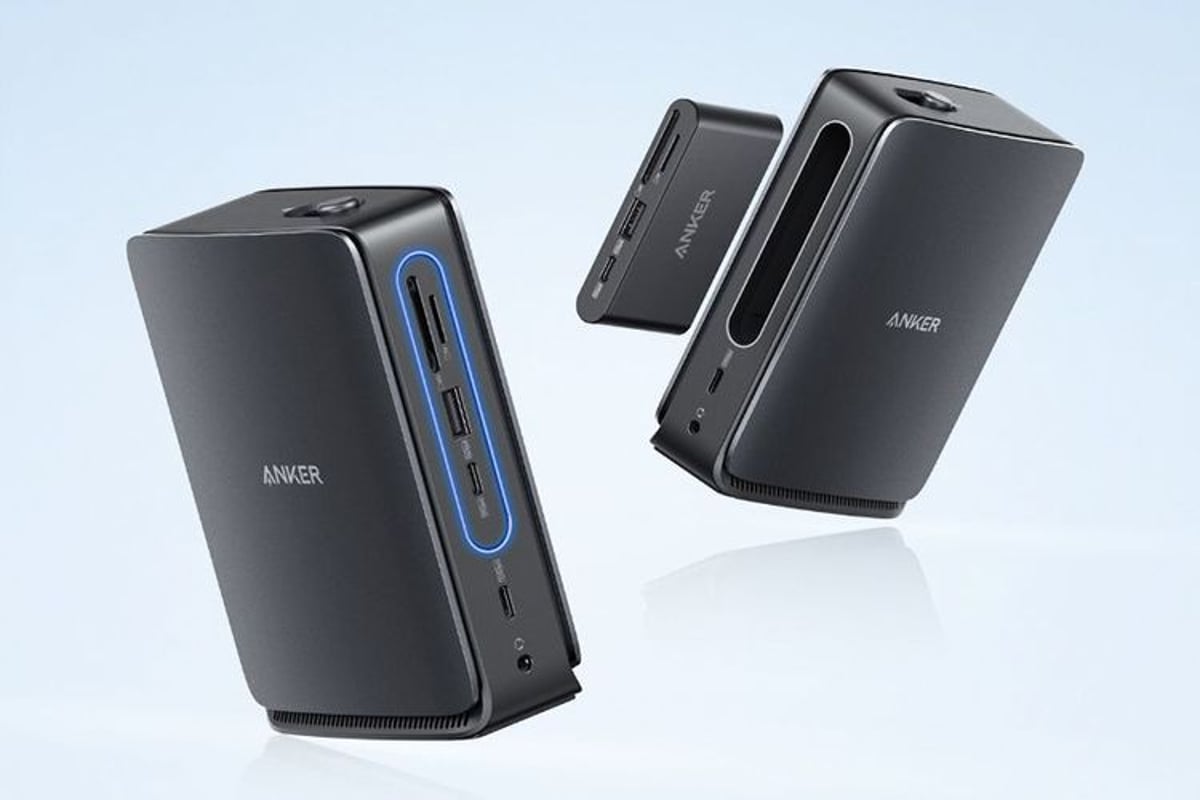
Anker is betting that laptop users are tired of making compromises between desk setup convenience and travel portability. The company's latest Nano Docking Station tackles this head-on with an innovative design that literally lets you have your cake and eat it too - a full-featured 13-port desktop dock that releases a portable hub when you need to hit the road.
The standout feature isn't just another USB-C hub, it's the execution. Press an eject button on top of the main dock, and out slides a credit card-sized hub that takes key ports with it - the 5Gbps USB-C and USB-A connections, SD and microSD slots, plus its own dedicated HDMI output and power input. It connects directly to your laptop without any cables, making it genuinely grab-and-go ready.
Anker is positioning this as a more affordable alternative to their premium offerings. At $149.99 retail (currently discounted to $119.99 for Amazon Prime members), it undercuts their 14-in-1 Thunderbolt 5 dock by $280. That's significant savings, though it comes with performance trade-offs that reveal where corners were cut.
The display capabilities tell the story of those compromises. Connect a single external monitor and you'll get crisp 4K at 60Hz - perfectly fine for most users. But try to drive three displays simultaneously using the dock's dual HDMI ports and single DisplayPort, and resolution drops to 1920x1080 across all screens. That's a meaningful limitation for power users who've grown accustomed to high-resolution multi-monitor setups.
Mac users face even steeper restrictions. While Windows laptops can extend displays independently across all four screens (including the built-in laptop display), Mac users are limited to mirroring their laptop screen across external displays. It's a frustrating limitation that stems from Apple's more restrictive external display protocols, but one that significantly impacts the dock's utility for Mac-centric workflows.
The technical requirements are straightforward but important. Your laptop's USB-C port needs to support both DisplayPort Alt Mode and Power Delivery to unlock the dock's full feature set. Most modern laptops check these boxes, but it's worth verifying before purchase - especially if you're planning to use this as your primary charging solution.
Beyond the removable hub innovation, the dock delivers a solid port selection that addresses most connectivity needs. The main unit houses a fast 10Gbps USB-C port for high-speed data transfers, complementing the portable hub's more modest 5Gbps connections. Two additional USB-A ports running at 480Mbps handle legacy devices, while gigabit Ethernet ensures reliable wired networking. A standard headphone jack rounds out the audio options.
The modular approach feels genuinely useful rather than gimmicky. The removable hub isn't trying to replace a full desktop setup - it's designed for those moments when you need just enough connectivity for a coffee shop work session or client presentation. Having HDMI output means you can still connect to external displays on the go, while the USB ports handle essential peripherals.
This pricing strategy puts Anker in direct competition with established players like CalDigit and OWC, but the removable hub feature creates a unique selling proposition. For users who genuinely split time between fixed desk setups and mobile work, it eliminates the need to buy separate desktop and travel solutions.
The timing feels right for this kind of hybrid approach. Remote work patterns have stabilized into predictable rhythms - intensive desk work mixed with mobile collaboration sessions. Rather than forcing users to choose one connectivity philosophy, Anker is acknowledging that modern work demands both extremes.
Anker's Nano Docking Station represents a thoughtful evolution in laptop connectivity, directly addressing the desktop-versus-mobile dilemma that plagues modern professionals. While the display limitations and Mac compatibility issues prevent it from being a universal solution, the removable hub concept feels like genuine innovation rather than marketing gimmickry. For users who split time between intensive desk work and mobile collaboration, the $149.99 price point makes this a compelling alternative to buying separate dock and travel hub solutions. The question isn't whether this approach will find an audience - it's whether other manufacturers will quickly follow suit with their own modular designs.