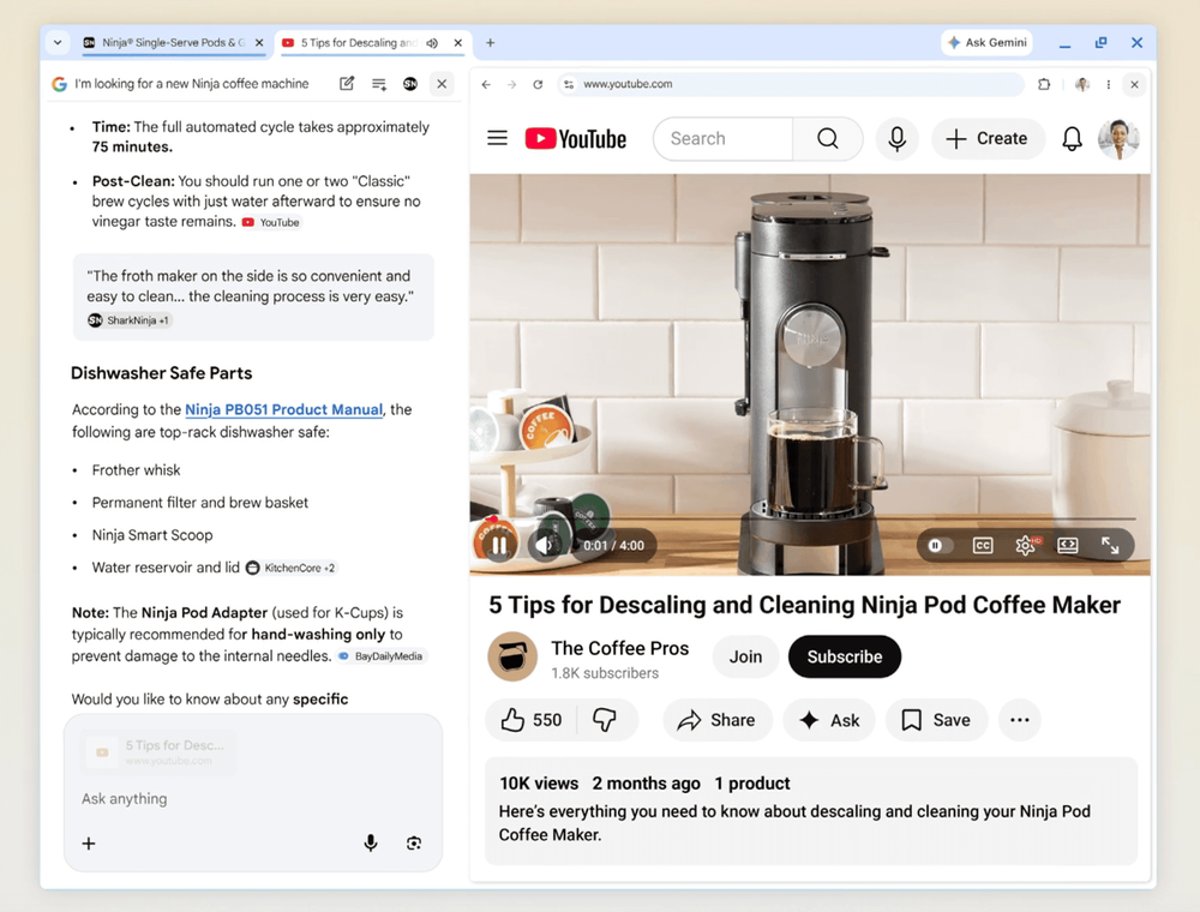
Google just dropped a subtle but significant upgrade to AI Mode that fundamentally changes how users interact with search sources. The company's rolling out a split-screen feature that keeps AI Mode conversations active while letting users browse linked sources side by side - no more tab juggling. According to The Verge, clicking on any source citation now opens the webpage alongside your chat, where you can ask follow-up questions about what you're reading in real-time.
Google is making a calculated play to keep you inside its AI-powered search experience longer. The company's latest update to AI Mode in Chrome introduces split-screen browsing that fundamentally changes how users interact with source material during AI conversations.
Instead of the jarring experience of clicking a source and watching it spawn a new tab, AI Mode now slides the linked webpage open right next to your ongoing chat. It's a small UX tweak that could have major implications for how people research online. You can now ask your AI assistant follow-up questions about specific content you're actively viewing, creating a fluid back-and-forth between human browsing and AI analysis.
The feature represents a natural evolution for AI Mode, which launched last year as Google's answer to ChatGPT's rising threat to traditional search. The chatbot-like interface lives in a dedicated tab on the left side of Google's search engine, but it's been rapidly expanding beyond simple question-and-answer exchanges.
Over the past year, Google has been systematically adding features that transform AI Mode from a conversational novelty into a genuinely useful productivity tool. The platform can now generate images of outfits and home decor based on text descriptions, visualize complete travel itineraries with interactive maps, and even handle restaurant reservations through agentic capabilities.
But this split-screen update feels different. It's not about adding flashy new AI capabilities - it's about fixing a fundamental friction point in how people actually use AI for research. Anyone who's tried to use ChatGPT or other chatbots for serious work knows the frustration: you're constantly context-switching between the AI's responses and the sources you need to verify them against.
Google is betting that seamless integration beats feature bloat. By keeping everything in one unified workspace, the company's making it easier to fact-check AI responses, dive deeper into specific claims, and build on information without losing your train of thought. It's the kind of thoughtful UX improvement that could give Google a meaningful edge in the increasingly crowded AI assistant market.
The timing is strategic too. As OpenAI, Microsoft, and other competitors race to add more AI features to their search experiences, Google's focusing on making its existing AI Mode indispensable through polish and integration. The split-screen feature works because it leverages Chrome's dominant browser position - something competitors can't easily replicate.
There's also a clear business incentive here. The longer Google keeps users inside AI Mode, the more opportunities it has to serve ads and gather data about how people interact with AI-generated content. Split-screen browsing naturally extends session times by reducing the friction of moving between the AI chat and source material.
For publishers and content creators, the update presents a double-edged sword. On one hand, having their content displayed directly alongside AI Mode could drive more engaged traffic. Users who can seamlessly reference sources while chatting might be more likely to actually read full articles rather than just accepting AI summaries. But there's also the risk that Google's making it easier for users to extract information without ever leaving the Google ecosystem - a concern that's already driving tension between the search giant and publishers.
The feature appears to be rolling out gradually, following Google's typical pattern of testing updates with small user groups before broader deployment. The company hasn't announced specific availability dates, but the phased rollout suggests Google's still fine-tuning how the split-screen interface handles different types of content and screen sizes.
Google's split-screen update to AI Mode isn't revolutionary, but it's exactly the kind of incremental improvement that wins users over in the long run. By eliminating the tab chaos that plagues AI-assisted research, Google's positioning AI Mode as the natural home for anyone trying to learn something new online. The real test will be whether this smoother experience translates into sustained engagement - and whether competitors can match this level of browser integration without controlling the underlying platform. For now, Google's reminding everyone that owning Chrome gives it unique advantages in the AI search wars.