the tech buzz

SUBSCRIBE
AIEnterpriseDealsSecurityCrypto
Newsletter

the tech buzz

Your premier source for technology news, insights, and analysis. Covering the latest in AI, startups, cybersecurity, and innovation.

FOLLOW US

THE DAILY

Get the latest technology updates delivered straight to your inbox.

Company

  • About Us
  • Editorial Team
  • Write For Usnew
  • Contact Us
  • Advertisenew

Legal

  • Privacy Policy
  • Terms of Service
  • Cookie Policy
  • Disclaimer
  • EULA
  • AI Code of Conduct

Resources

  • Newsletters
  • RSS Feeds
  • Subscribe
  • Pricing & Packages
  • Sitemap
  • Archives
  • TechBuzz Pressnew

PUBLISH WITH US

Reach 1.1M+ subscribers via TechBuzz Press.

TechBuzz Press

HAVE A TIP?

Send us a tip using our anonymous form.

Send a tip

HAVE QUESTIONS?

Reach out to us on any subject.

Ask Now

Browse by Category

AIBlockchainCloudSecurityDataDealsInvestmentsEnterpriseVenturesIoTMobileRoboticsSoftwareStartupsAppleMetaMicrosoftOpenAiGoogleTesla

© 2026 The Tech Buzz. All rights reserved.

the tech buzz

macOS 26 Beta: Latest Features & Access

ArticlesNewsletters
ArticlesNewsletters
Tech

macOS 26 Beta: Latest Features & Access

Explore new features in macOS 26 Beta and how to access it.

by Dolapo Omoleme

PUBLISHED: Mon, Jul 7, 2025, 9:00 PM UTC | UPDATED: Fri, Sep 4, 2026, 2:55 PM UTC

Add as a preferred source on Google
macOS 26 Beta: Latest Features & Access

Photo: Apple

TL;DR:

  • Enroll in Apple Developer Program or Beta Software Program to access macOS 26 Beta
  • Download and install the beta profile from Apple's beta download page
  • Ensure device compatibility and backup data before installation
  • New features focus on enhanced user interface and performance improvements

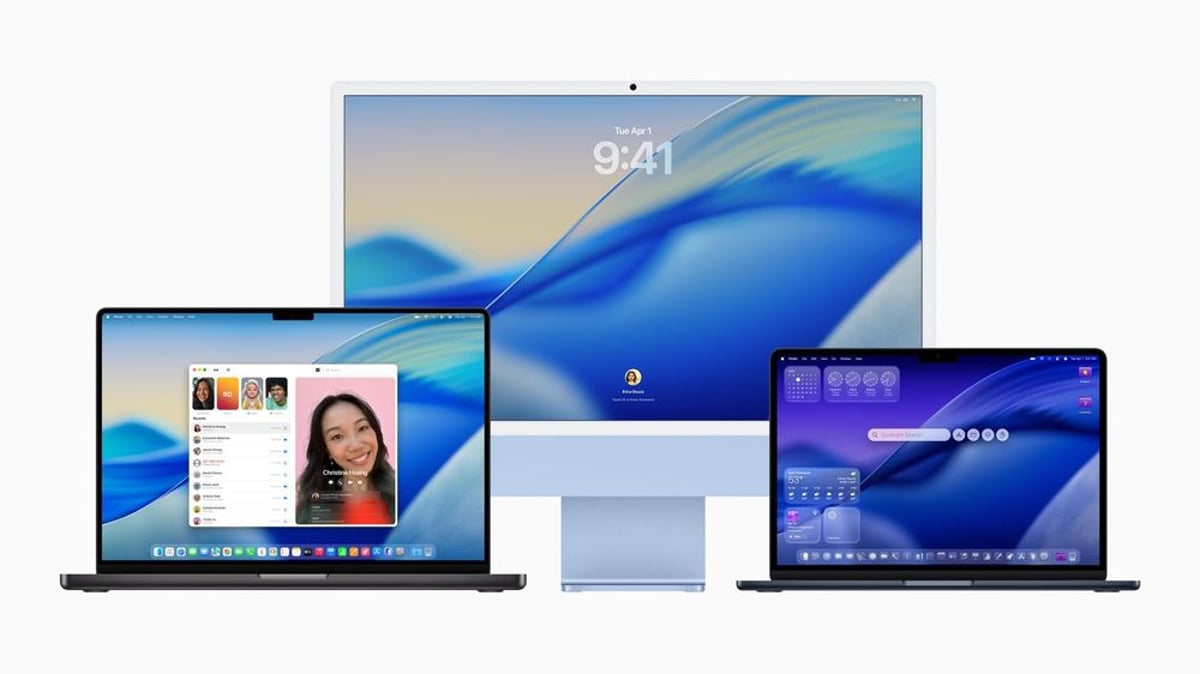
As Apple continues to innovate, the latest macOS 26 Beta promises a slew of new features aimed at enhancing user experience and performance. Here’s all you need to know about accessing the beta version and the exciting features it brings.

Apple has strategically structured access to the macOS 26 Beta via its Developer Program and the Beta Software Program. For developers, joining the Apple Developer Program grants early access to the latest features, allowing them to integrate and test apps with new macOS functionalities. Meanwhile, the Beta Software Program serves adventurous Mac users willing to test debut features before anyone else.

Enrolling requires a commitment to Apple's terms, but both pathways provide a chance to glimpse and influence the future of macOS.

Advertisement

To download the macOS 26 Beta, after enrollment, visit Apple’s beta download portal. By clicking Install Profile, your Mac can easily receive updates directly from Apple's servers.

New Features in macOS 26 Beta:
The latest updates include notable improvements in UI, aiming for a more streamlined and efficient interface. Users can expect optimized multitasking capabilities and refined integration with other Apple services. Performance enhancements focus on speed and resource management, contributing to better battery life and faster app responses.

Moreover, Apple is rumored to experiment with advanced AI features, further embedding machine learning capabilities into the macOS ecosystem. This could transform user interaction patterns and automation capabilities, aligning macOS with broader tech trends.

Advertisement

Before installation, backing up your Mac using Time Machine or another reliable method is crucial to prevent data loss.

Access and Installation:

  1. Enroll in the Apple Developer or Beta Software Program.
  2. Download the beta profile via Apple's portal.
  3. Ensure your device is compatible and data is backed up.
  4. Follow onscreen instructions to complete the installation.

Joining the macOS 26 Beta community not only provides a peek into what’s to come but also an opportunity to aid Apple in refining the OS through feedback. With these steps, you ensure a seamless experience while diving into the future of macOS.

Advertisement

Advertisement

Trending Now

1

GoPro CEO Vows Cameras Stay Core After Starman Deal

2

Judge Splits Ruling in X vs. Twitter Rival Fight

3

Tim Cook Steps Down, Ternus Takes Apple's Helm

4

Google's Lyria 3.5 Brings AI Music to Gemini

5

Google Translate Gets Listening Mode, Live Background Mode

More in Tech

The Dumbest Things That Happened in Tech This Year

The Dumbest Things That Happened in Tech This Year

Samsung Wallet Adds Porsche Digital Keys for Galaxy Users

Samsung Wallet Adds Porsche Digital Keys for Galaxy Users

Tech Giants Race to Build Next-Gen Aircraft Black Boxes

Tech Giants Race to Build Next-Gen Aircraft Black Boxes

CurrentBody's LED Face Mask Hits Record Low in Black Friday Sale

CurrentBody's LED Face Mask Hits Record Low in Black Friday Sale

Apple Pulls Gay Dating Apps from China Store on Gov Order

Apple Pulls Gay Dating Apps from China Store on Gov Order

Terranova Raises $7M to Lift Cities with Terraforming Robots

Terranova Raises $7M to Lift Cities with Terraforming Robots

More Articles

Google deploys AI to tackle biodiversity crisis and nature loss

Google deploys AI to tackle biodiversity crisis and nature loss

Nov 6

Pig Kidney Transplant Sets 9-Month Record Before Removal

Pig Kidney Transplant Sets 9-Month Record Before Removal

Oct 27

EU hits TikTok and Meta with DSA transparency violations

EU hits TikTok and Meta with DSA transparency violations

Oct 24

Amazon unveils massive NBA studio with 2,300 LED screens

Amazon unveils massive NBA studio with 2,300 LED screens

Oct 15

Samsung's Frankfurt Showroom Transforms B2B Display Strategy

Samsung's Frankfurt Showroom Transforms B2B Display Strategy

Oct 1

Samsung Expands Toyota Partnership With 23,000 Smart Displays

Samsung Expands Toyota Partnership With 23,000 Smart Displays

Sep 29