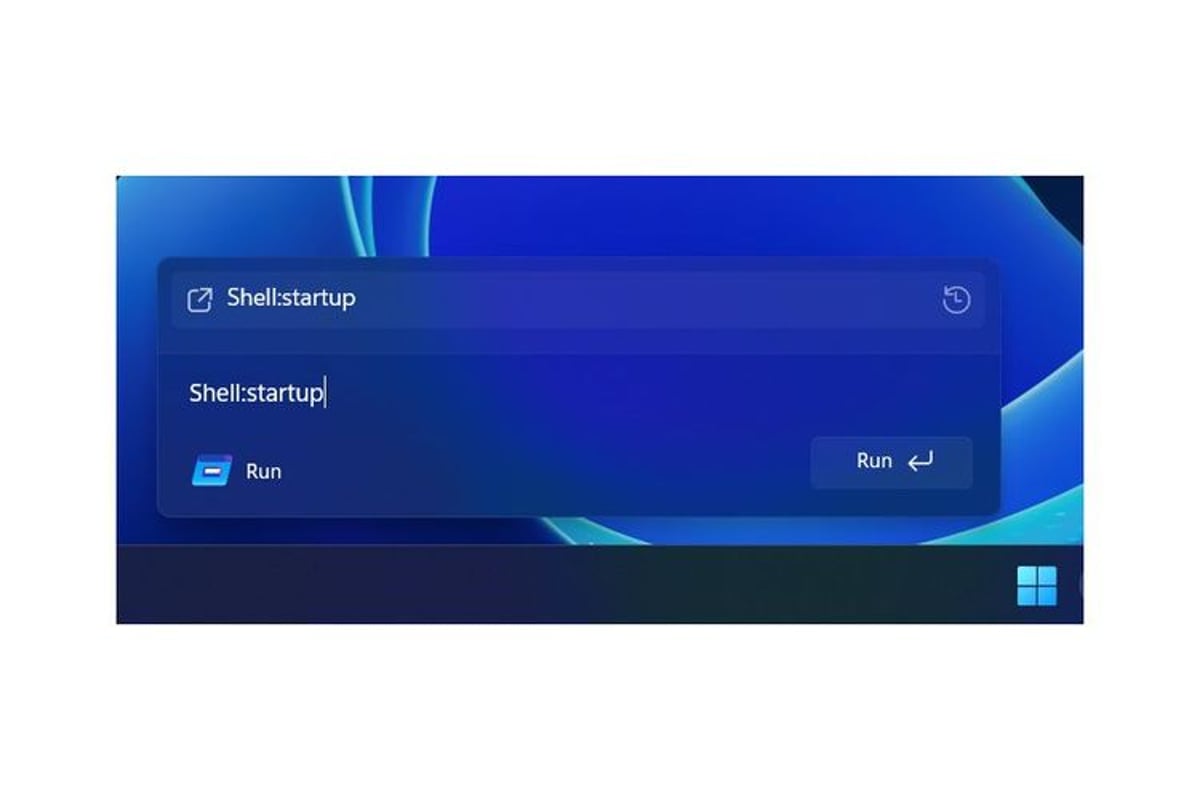
Microsoft is finally giving Windows' humble Run dialog its first major visual overhaul since Windows 95. The company is quietly testing a refreshed design in Windows 11 preview builds that modernizes the 30-year-old power user tool while maintaining its core functionality. The update comes as third-party launchers like Raycast gain traction on Windows, potentially pressuring Microsoft to evolve its aging interface tools.
Microsoft just broke a three-decade streak. The tech giant is testing its first major visual update to Windows' Run dialog since the feature debuted in Windows 95, according to X user Phantomofearth who discovered the changes in the latest Windows 11 preview builds.
The timing isn't coincidental. Just months after Raycast launched on Windows with its sleek launcher interface, Microsoft appears to be modernizing one of Windows' most enduring power user tools. The refreshed Run prompt ditches the utilitarian Windows 95-era dialog box for something that actually looks like it belongs in 2025.
But don't worry about muscle memory - the new interface functions exactly like the old one. Power users can still fire up Microsoft Paint with "mspaint," launch Calculator with "calc," or access the DirectX Diagnostic Tool with "dxdiag." The Win+R shortcut remains unchanged, and all those memorized commands still work.
What's different is the visual presentation. The modernized Run dialog adopts Windows 11's design language, complete with rounded corners and updated typography. It looks more like a contemporary launcher than a leftover from the Clinton administration. The before-and-after comparison shows just how dated the original interface had become.
Microsoft hasn't officially announced this update yet, but The Verge's Tom Warren expects it to appear in official builds within weeks. The company previously committed to adding dark mode support to Run, and this visual refresh appears to be part of that broader modernization effort.
Interestingly, Microsoft is making the new design optional. Users who prefer the classic interface can toggle back to the original Run dialog through Windows 11's advanced system settings. It's a rare compromise from a company that usually forces interface changes on users.
This update fits into Microsoft's recent launcher evolution. The company has been steadily modernizing its productivity tools with Command Palette and PowerToys Run, both offering more sophisticated alternatives to the basic Run dialog.
The competitive pressure is real. Raycast's Windows debut brought Mac-like launcher functionality to Microsoft's platform, complete with clipboard management, shortcuts, and extensible plugins. It's the kind of polished experience that makes Windows' aging interface elements look increasingly outdated.
For enterprise users, this represents more than just a cosmetic update. The Run dialog remains a crucial tool for IT administrators and power users who need quick access to system utilities and administrative tools. A more modern interface could increase adoption among younger workers who expect contemporary design standards.
The update also signals Microsoft's broader strategy of incremental Windows modernization. Rather than dramatic overhauls that disrupt workflows, the company is methodically updating individual components to match Windows 11's visual standards while preserving functionality.
Microsoft's Run dialog refresh might seem like a minor update, but it reflects the company's careful balance between modernization and backwards compatibility. By making the new design optional while improving the user experience, Microsoft acknowledges that even 30-year-old interfaces can evolve without alienating their core users. As third-party launchers continue pushing Windows toward more sophisticated productivity tools, this update suggests Microsoft isn't ready to cede that territory just yet.