ZSA just launched the Navigator, a $169 trackball that magnetically attaches to its Voyager split keyboard, creating a $534 ergonomic powerhouse that's either brilliant or bewildering depending on your patience for customization. The combo targets keyboard enthusiasts willing to completely rebuild their typing habits for potentially massive ergonomic gains.
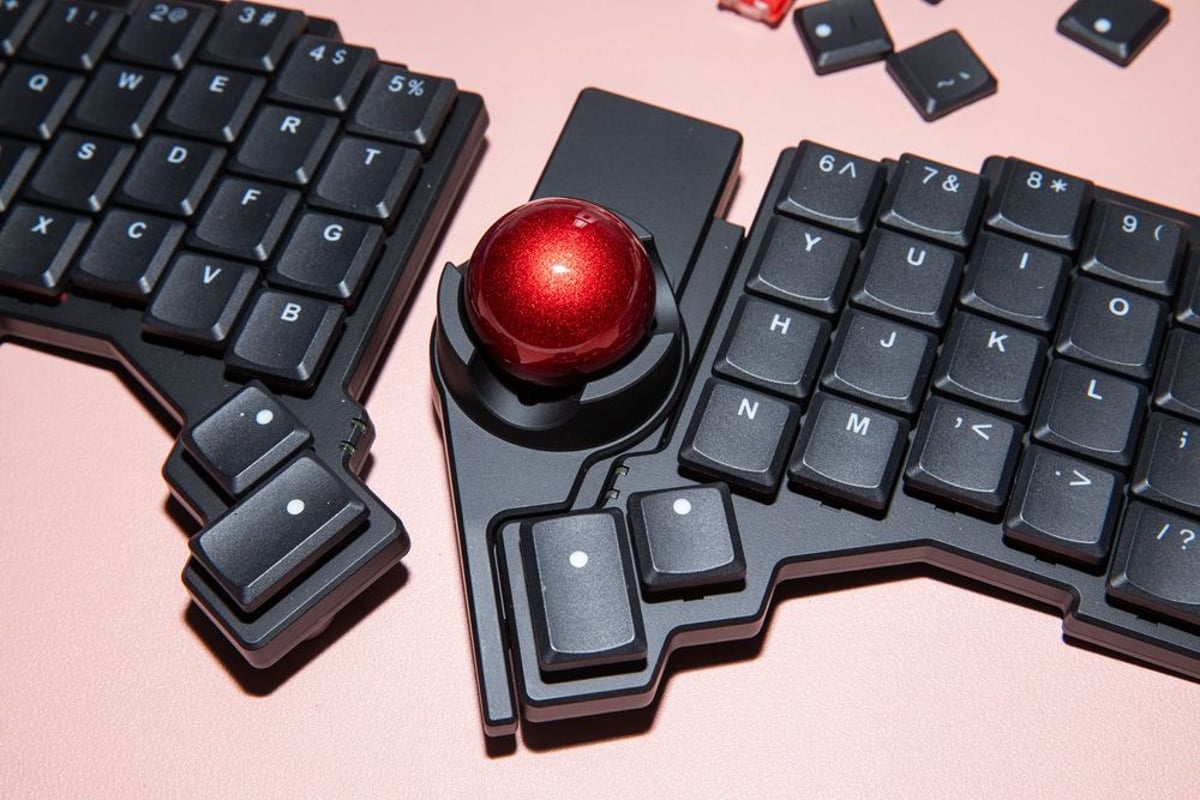
ZSA just made trackball dreams come true with the Navigator, a bright red magnetic trackball that snaps onto its Voyager split keyboard. But this isn't your typical plug-and-play upgrade - it's an expensive commitment to completely rethinking how you interact with your computer.
The Navigator, announced in August and now shipping for $169, attaches magnetically to either half of ZSA's $365 Voyager keyboard. That brings the total investment to $534 before adding optional accessories like the $89 tripod mount. According to The Verge's hands-on review, the trackball feels "really smooth to roll around" and positions perfectly next to your typing fingers.
The magic happens through ZSA's Oryx configurator software, which lets users program any key to be anything - macros, media controls, mouse clicks, or multi-function keys that behave differently when tapped, held, or double-tapped. "This type of customization is pretty standard for enthusiast keyboards, but I've found Oryx's software to be particularly easy to use," reviewer Jay Peters notes.
But here's where things get complicated. The Voyager's 52-key columnar layout means serious compromises. Peters, an ergonomic keyboard veteran who previously used ZSA's larger Moonlander, found himself constantly short on keys. "The thing I missed the most was a reliable set of arrow keys," he explains. The trackball module doesn't include mouse buttons, forcing users to sacrifice precious keyboard real estate for click functions.
The learning curve is real. Peters admits getting "frustrated with the Voyager after a week" during busy work periods, including iPhone launch coverage and Meta Connect. "I was much slower with them than my usual setup," he says. The columnar key arrangement, where fingers move in straight vertical lines rather than the traditional staggered pattern, requires weeks of adjustment.
Yet ZSA designed the Voyager specifically for mobile professionals. The keyboard comes with a carrying case and magnetic tenting nubs for subtle angle adjustments. Users can mount the halves to desk arms or chair mounts, or even create custom magnetic accessories using the included magnets.
The hardware itself impresses with hot-swappable Kailh Choc v1 switches (Peters tested Pro Red linear switches), RGB lighting, and that signature trackball red color. The magnetic attachment system works seamlessly, letting users choose left or right-side trackball placement at checkout.
Compared to traditional ergonomic solutions, the combo offers unprecedented portability. Peters' usual setup includes a 95-key Kinesis Freestyle Pro and Contour Unimouse - bulky but reliable tools that don't travel well. The Voyager/Navigator combo fits in a laptop bag while maintaining full customization capabilities.
The target audience is clear: keyboard enthusiasts with time to tinker. Peters, who previously taught himself Colemak layout and spent months perfecting Moonlander configurations, represents the ideal user. But life circumstances matter. "As a father to a very busy toddler, I just don't have the time or energy to make that happen," he explains.
Interestingly, Peters found returning to the combo after weeks away surprisingly natural. "I settled back into the Voyager and Navigator really easily," he notes, suggesting the initial learning investment pays long-term dividends for committed users.
The price point reflects the niche market. At $534 total, this targets professionals with specific ergonomic needs or enthusiasts treating input devices as serious hobby equipment. For comparison, quality traditional ergonomic keyboards typically cost $150-300, while premium trackballs run $50-150.
ZSA's modular approach opens future possibilities. The magnetic system could theoretically support other accessories beyond the Navigator, creating an ecosystem of attachable tools for different workflows.
The ZSA Voyager and Navigator combo represents the pinnacle of customizable ergonomic input devices, but success requires serious commitment. For keyboard enthusiasts with time to perfect their setup, this $534 investment could transform their computing experience. For everyone else, the learning curve and layout limitations make traditional ergonomic solutions more practical. The magnetic trackball concept is genuinely innovative - it just demands patience most busy professionals don't have.