the tech buzz

SUBSCRIBE
AIEnterpriseDealsSecurityCrypto
Newsletter

the tech buzz

Your premier source for technology news, insights, and analysis. Covering the latest in AI, startups, cybersecurity, and innovation.

FOLLOW US

THE DAILY

Get the latest technology updates delivered straight to your inbox.

Company

  • About Us
  • Editorial Team
  • Write For Usnew
  • Contact Us
  • Advertisenew

Legal

  • Privacy Policy
  • Terms of Service
  • Cookie Policy
  • Disclaimer
  • EULA
  • AI Code of Conduct

Resources

  • Newsletters
  • RSS Feeds
  • Subscribe
  • Pricing & Packages
  • Sitemap
  • Archives
  • TechBuzz Pressnew

PUBLISH WITH US

Reach 1.1M+ subscribers via TechBuzz Press.

TechBuzz Press

HAVE A TIP?

Send us a tip using our anonymous form.

Send a tip

HAVE QUESTIONS?

Reach out to us on any subject.

Ask Now

Browse by Category

AIBlockchainCloudSecurityDataDealsInvestmentsEnterpriseVenturesIoTMobileRoboticsSoftwareStartupsAppleMetaMicrosoftOpenAiGoogleTesla

© 2026 The Tech Buzz. All rights reserved.

the tech buzz

LG Monitors Silently Install McAfee Adware via Windows Update

ArticlesNewsletters
ArticlesNewsletters
Consumer Tech/Gaming monitors

LG Monitors Silently Install McAfee Adware via Windows Update

LG UltraGear monitors auto-install bloatware through Windows 11, sparking privacy backlash

by The Tech Buzz

PUBLISHED: Mon, Jul 20, 2026, 4:48 PM UTC | UPDATED: Fri, Sep 4, 2026, 7:26 PM UTC

Add as a preferred source on Google
LG Monitors Silently Install McAfee Adware via Windows Update

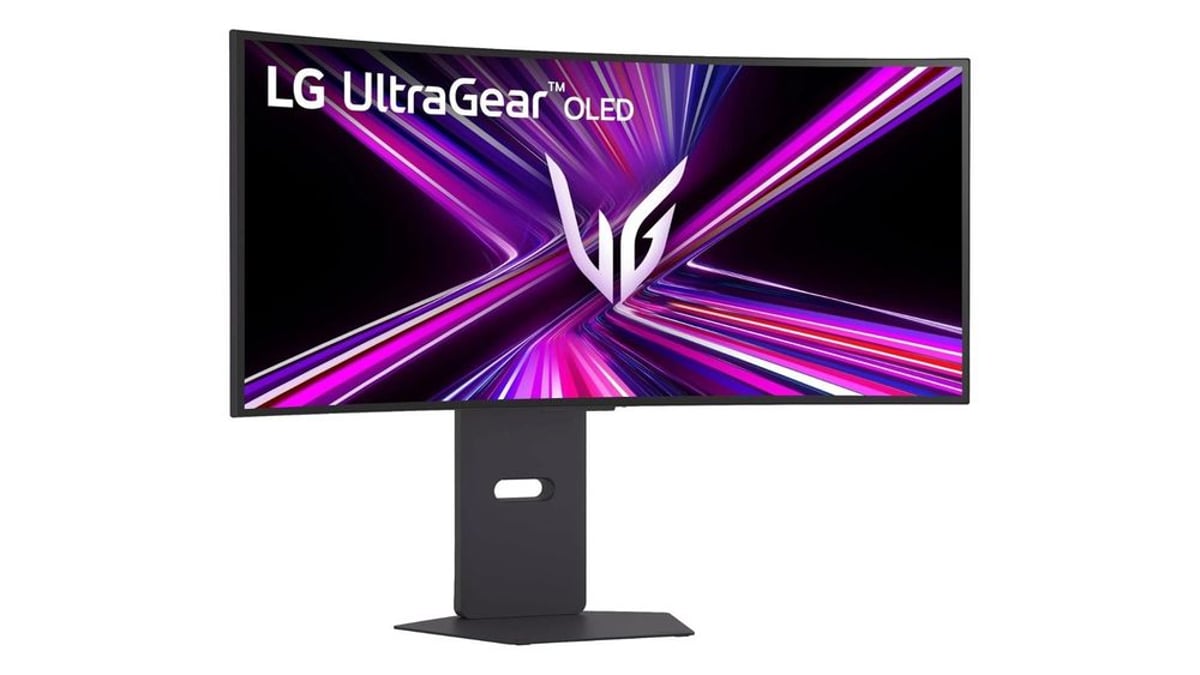
LG is facing a consumer backlash after tech investigators discovered the company's UltraGear monitors are silently installing bloatware on Windows 11 PCs without user consent. The hardware giant is leveraging Microsoft's Windows Update system to push its LG Monitor App Installer, which promptly bombards users with McAfee antivirus ads and prompts for additional LG software. The revelation, exposed by hardware investigation channel Gamers Nexus, has reignited debate about the boundaries of device drivers and user control in the Windows ecosystem.

LG just turned a simple monitor connection into a bloatware nightmare. When users plug in one of the company's UltraGear gaming monitors to a PC running Microsoft Windows 11, they're getting more than display drivers - they're getting unwanted software that pushes ads for McAfee antivirus.

The investigation from Gamers Nexus reveals exactly how LG is exploiting the Windows Update pipeline. Connect a new LG UltraGear monitor, and Windows Update silently downloads and installs LG driver updates along with something called the LG Monitor App Installer. No permission dialog. No notification. Just software appearing on your machine because you connected a display.

The kicker? The LG Monitor App Installer doesn't actually control your monitor. Instead, it serves as a landing page pushing users to download additional LG applications and, more controversially, displays prominent ads for McAfee security software. Users have reported large pop-up ads suddenly appearing in the bottom-right corner of their screens, interrupting workflows and gaming sessions.

This isn't a new problem - it's an escalating one. According to discussions on Microsoft's Tech Community forums, users have been complaining about LG's stealth installation tactics since at least 2024. But recent activity on Reddit's LG OLED community shows frustration reaching a boiling point, with users expressing outrage at finding software they never authorized appearing on their systems.

Advertisement

The controversy puts both LG and Microsoft in an uncomfortable spotlight. Windows Update is supposed to deliver critical drivers that help hardware function properly. But LG appears to be treating it as a distribution channel for what amounts to adware. The company is packaging promotional software alongside legitimate driver updates, betting that most users won't notice or won't know how to remove it.

For affected users, the experience feels like a violation of trust. You buy a premium gaming monitor - LG's UltraGear lineup targets enthusiasts willing to pay for high refresh rates and low latency - only to have your new hardware spam you with ads the moment you plug it in. It's the kind of bloatware behavior typically associated with budget laptops from the early 2010s, not modern gaming peripherals.

The technical implementation makes the situation worse. Because the software arrives through Windows Update, it bypasses the normal installation prompts users expect when adding new programs. There's no decline button, no checkbox to uncheck, no opportunity to opt out. The software simply appears, leveraging Microsoft's trusted update mechanism to gain access to user systems.

LG hasn't issued a public statement addressing the controversy, and it remains unclear whether the company views this behavior as problematic. The apparent partnership with McAfee suggests there's a financial incentive at play - security software vendors routinely pay hardware manufacturers to pre-install trial versions of their products or display promotional content.

Advertisement

But the backlash reveals how consumer expectations around PC hardware have shifted. Gamers and power users, in particular, have grown increasingly sensitive to unwanted software, privacy concerns, and the erosion of user control. What might have been tolerated a decade ago now triggers immediate outrage and calls for boycotts.

The situation also raises questions about Microsoft's oversight of its Windows Update ecosystem. If hardware vendors can push advertising software through driver updates, where does the line get drawn? Could other peripheral makers follow LG's lead, turning Windows Update into a vector for promotional content?

For now, affected users are left with manual workarounds - uninstalling the LG Monitor App Installer through Windows settings and disabling automatic driver updates for display devices. But that's a band-aid solution that shouldn't be necessary when connecting a monitor to a PC.

LG's silent installation of advertising software through Windows Update represents a troubling erosion of user consent in the PC hardware space. What should be a straightforward driver installation has become a vector for unwanted promotional content, raising serious questions about vendor practices and Microsoft's oversight of its update ecosystem. For consumers, the message is clear: even premium hardware purchases now come with strings attached, and the battle for control over your own PC continues to shift in favor of manufacturers looking for new revenue streams. Users considering LG monitors may want to weigh whether the hardware specs are worth the hassle of cleaning unwanted software off their machines.
More Topics:
Gaming monitors

Advertisement

Advertisement

Trending Now

1

GoPro CEO Vows Cameras Stay Core After Starman Deal

2

Judge Splits Ruling in X vs. Twitter Rival Fight

3

Tim Cook Steps Down, Ternus Takes Apple's Helm

4

Google's Lyria 3.5 Brings AI Music to Gemini

5

Google Translate Gets Listening Mode, Live Background Mode

People Also Ask

LG UltraGear monitors auto-install the LG Monitor App Installer via Windows Update when connected to Windows 11 PCs without user permission. The installer pushes McAfee antivirus ads and LG software promotions to users' screens. Gamers Nexus investigated this behavior in 2024, revealing LG exploits Microsoft's update pipeline to distribute promotional content alongside legitimate drivers.

Uninstall the LG Monitor App Installer through Windows Settings under Apps > Installed Apps, then search for and remove the application. Additionally, disable automatic driver updates for display devices in Device Manager to prevent reinstallation. Users can also manually delete the software through Windows' uninstall programs list.

The LG Monitor App Installer is promotional software that LG automatically installs via Windows Update with LG UltraGear monitors. Despite its name, it doesn't control your monitor. Instead, it displays pop-up ads for McAfee antivirus and LG applications in the bottom-right corner of users' screens, interrupting workflows and gaming sessions.

Yes, disable automatic driver updates for display devices in Windows Device Manager. Right-click your monitor device, select Properties, then prevent automatic updates. However, this requires manual intervention after connecting new monitors. LG hasn't provided an official opt-out mechanism for the bloatware installation.

The LG Monitor App Installer isn't traditional spyware but is considered adware that bypasses normal installation prompts. It displays unwanted McAfee promotional content and collects user data. Users have reported it since 2024, with escalating complaints on Reddit. LG hasn't publicly addressed the practice or stated whether it's intentional.

Security software vendors typically pay hardware manufacturers to display promotional content or pre-install trial versions. The partnership suggests LG receives financial incentives from McAfee for bundling advertisements with monitor drivers. LG hasn't publicly confirmed this arrangement or explained the McAfee integration strategy.

More in Consumer Tech

Judge Splits Ruling in X vs. Twitter Rival Fight

Judge Splits Ruling in X vs. Twitter Rival Fight

Tim Cook Steps Down, Ternus Takes Apple's Helm

Tim Cook Steps Down, Ternus Takes Apple's Helm

Google Translate Gets Listening Mode, Live Background Mode

Google Translate Gets Listening Mode, Live Background Mode

Samsung Sweeps IFA 2026 Innovation Awards

Samsung Sweeps IFA 2026 Innovation Awards

Feds Probe Tesla Cybercab Hours After Austin Launch

Feds Probe Tesla Cybercab Hours After Austin Launch

Instagram's AI Labels Are Misfiring Badly

Instagram's AI Labels Are Misfiring Badly

More Articles

Ugreen Bets Its NAS Roots on Smart Home AI

Ugreen Bets Its NAS Roots on Smart Home AI

Sep 4

Tesla's Cybercab Launch Was Oddly Quiet

Tesla's Cybercab Launch Was Oddly Quiet

Sep 4

Microsoft Caps Xbox Cloud Gaming Hours in November

Microsoft Caps Xbox Cloud Gaming Hours in November

Sep 3

Qualcomm Bets $70M on Ultrahuman's Smart Ring Leap

Qualcomm Bets $70M on Ultrahuman's Smart Ring Leap

Sep 3

Sonos CEO Reveals AI Overhaul With Sonos 27

Sonos CEO Reveals AI Overhaul With Sonos 27

Sep 3

Nvidia's RTX Spark Chip Brings AI PCs to Life

Nvidia's RTX Spark Chip Brings AI PCs to Life

Sep 3