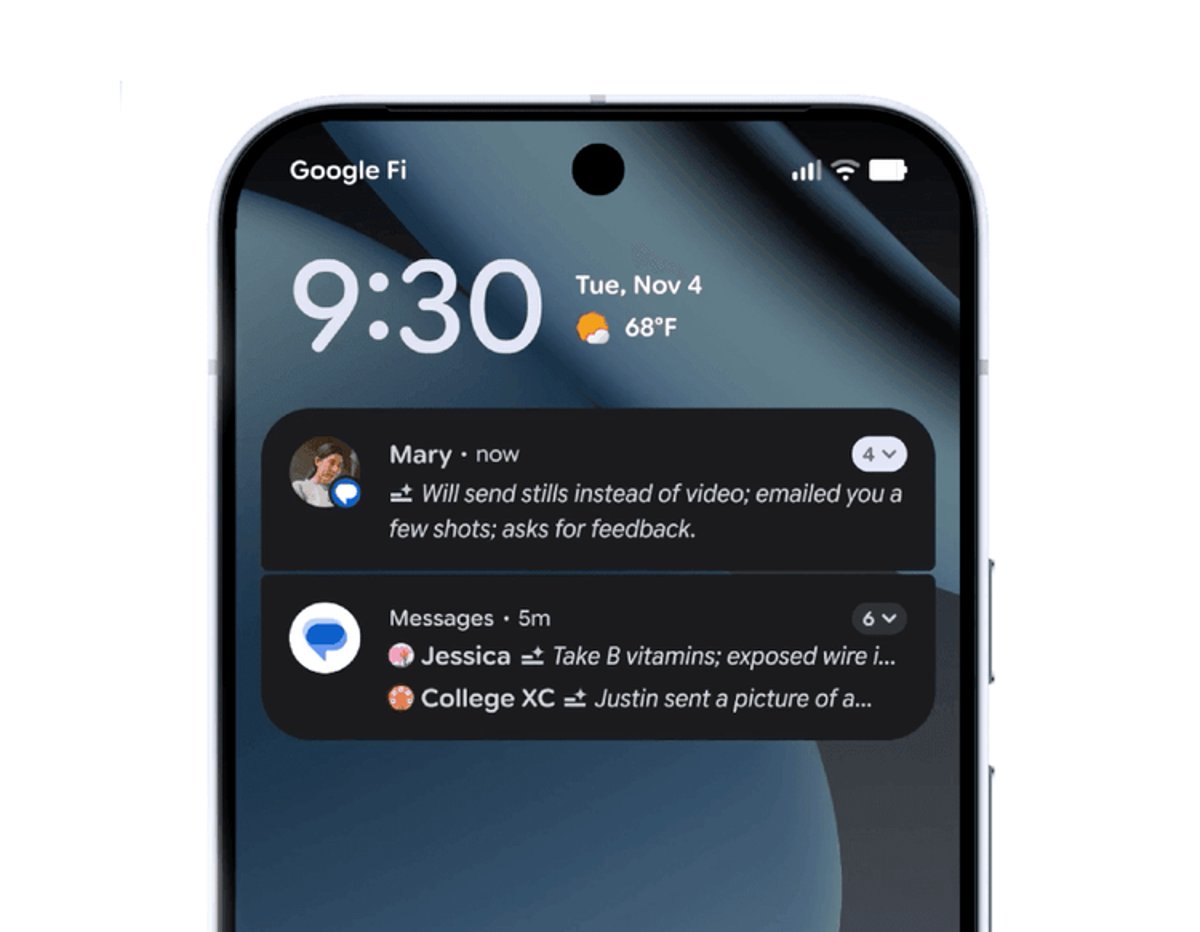
Google is preparing to roll out AI-powered notification summaries to all Android devices with the latest Android 16 update. The feature, currently exclusive to Pixel phones since last month, will soon condense lengthy group chats and text messages into digestible snippets for users across Samsung, OnePlus, and other Android manufacturers.
Google just made its biggest AI move for mainstream Android users. The company's notification summaries feature, which quietly launched on Pixel phones last month, is now bundled into Android 16 and heading to millions of third-party devices.
Unlike Apple's controversial approach to AI summaries that created wonky news headlines, Google is playing it safe by limiting the feature to messaging apps. The system will automatically condense longer group conversations and text threads into brief, glanceable snippets - no more scrolling through 47 unread messages to figure out what happened.
The timing signals Google's confidence in the technology after months of testing on Pixel devices. According to Google's official Android blog, the feature performed well enough to include in the broader Android ecosystem, suggesting Samsung Galaxy, OnePlus, and other Android users will get their first taste of on-device AI summarization soon.
But notification summaries are just the headline feature. Google is also launching an AI-powered notification organizer that automatically groups and silences lower-priority alerts from promotions, news apps, and social platforms. Think of it as an intelligent filter that learns which notifications actually matter to you versus which ones can wait.
The accessibility improvements mark Google's most comprehensive update in years. Expressive Captions, which captures emotional intensity in speech, is expanding from Android devices to YouTube globally. Videos uploaded after October will automatically include emotional tags like "[joyful]" or "[frustrated]" during livestreams and real-time conversations.
Google is also streamlining voice controls across the platform. Users can now activate Voice Access - which lets you control your entire phone through speech - by simply saying "Hey Google, start Voice Access" instead of navigating through settings menus. The TalkBack screen reader gained two-finger double-tap gestures for voice dictation in Gboard, making text input more intuitive for visually impaired users.
Parents get significant new controls consolidated within Android Settings. The update centralizes screen time management, app usage controls, and downtime scheduling in one location, eliminating the need to jump between multiple menus and third-party apps.
Perhaps the most specialized addition is Fast Pair for hearing aids, starting with Demant devices before expanding to Starkey models in early 2026. This one-tap Bluetooth LE connection addresses a major accessibility gap that's affected millions of Android users who rely on hearing assistance technology.
The broader Android ecosystem update includes scam detection through Circle to Search and an urgent call feature in the Phone by Google app, though both users need Android devices with Google's calling app set as default for the urgent alerts to work.
Google's measured approach to AI features contrasts sharply with competitors rushing half-baked implementations to market. By testing notification summaries exclusively on Pixels before the wider rollout, the company avoided the embarrassing AI-generated news headlines that plagued Apple Intelligence's launch.
Google's Android 16 rollout represents a calculated expansion of AI features that prioritizes reliability over flashiness. By successfully testing notification summaries on Pixel devices first, the company is now confident enough to bring these tools to the broader Android ecosystem. The comprehensive accessibility updates and parental controls show Google isn't just chasing AI trends but addressing real user needs across diverse demographics. As third-party Android manufacturers begin pushing these updates, millions of users will get their first hands-on experience with practical AI that actually improves daily phone interactions.